Behringer CMD PL-1 performance mapping
Hey guys,
This is my custom Traktor PL-1 mapping and I’m glad to share it with everybody. Use it to control all four decks four FX units, INSTANT Grats effects and sixteen jogFX presets. Plus more.
Check it out:

DOWNLOAD
Page 1:
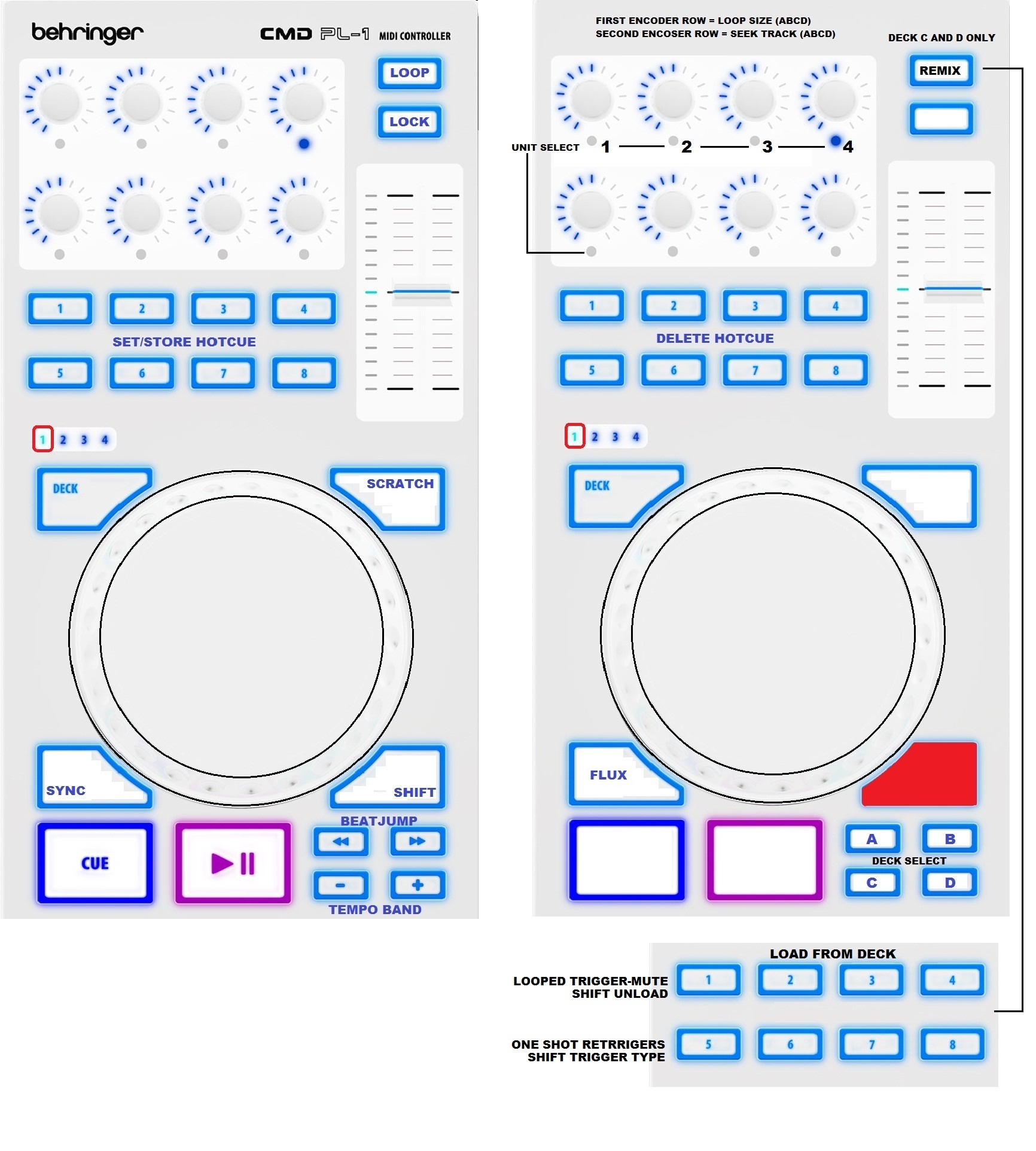
From this page you can select and control any of four decks.Things are set so four little buttons in bottom become active as deck selector while shift (TAP) is on hold - that way tempo banding and beat jumping are available to play with on the fly (see pic). BTW selector is actually a modifier and not Traktor’s deck focus. I use focus for other stuff in this and for a lot of my other mappings so I didn’t want that to have any clash when using them all together. The LOAD button is mapped for loop set (flashing active) - if you hold shift and press this button you’d be able to change deck flavor but only for decks C and D - once any of this two decks are set as remix deck the hotcue buttons should become sample controls. 1-4 will load from deck (A to C and B to D), next presses will play/mute (shift unload) and 5-8 are retriggers (shift trigger type). Also there is FLUX mode toggle (shift SYNC). The Pl-1 pitch fader is great and it allows movement of 0.2 BPM, as I wanted to made it even more accurate I’ve set a shift function that turns pitch fader in relative mode for ultra fine 0.1 BPM adjustment.
Page 2:

Track preparation tool is based on Traktor’s deck focus so you can use this tool for any deck. Use buttons 1-4 to pick a deck and 5-8 to prep your track. I’ve mapped it to easily set and adjust grid in just few steps.
Platter: Touch to zoom in a track and turn to get right place for grid marker.
Button 5: Set grid marker and unlock BPM (shift delete). LED indicate the cue.
Button 6: Zoom out, play, sync and tick on. A four buttons below the shift are dedicated for deck tempo and grid fine adjust (shift to increase resolution). Flash in beat.
Button 7: Track stop.
Button 8: Lock the BPM for that track.
But still, There are some standard transport controls like cue, play, sync and SCRATCH button is mapped to toggle tick (shift lock BPM). Pitchfader manually controls waveform zoom and it’s set for soft takeover. That’s not all for this page, well in first I thought to dedicate this page for gridding only but I thought that some INSTANT gratify effects would be cool to include in this mapping so I made two switches placed at LOAD and LOCK buttons (hold and toggle FX mode). Button has flash state to indicate ether one of modes are selected and active - pressing it again gets back to prep tool and shut the LED off.
Note on IG. The gater is acting momentary even in toggle mode because that makes more sense, well at least for me. Off course, you can still store or save it by switching PL-1 pages. Pitchfader is mapped for my favorite combo, it’s beatslicer and beatmasher! But when you set slicer in front of masher in any FX unit the masher will not just grab that little sample but also the peace of recording that beatslicer has made and keep repeating in various paterns regards to the position of farder where you grab sounds at beginning. This fader also engages transpose effect and set it at 0.500 from where you can use platter to modulate it - releasing the jog deactivate all of this three effects. Beatmasher supercombo is included.
Page 3 and 4:
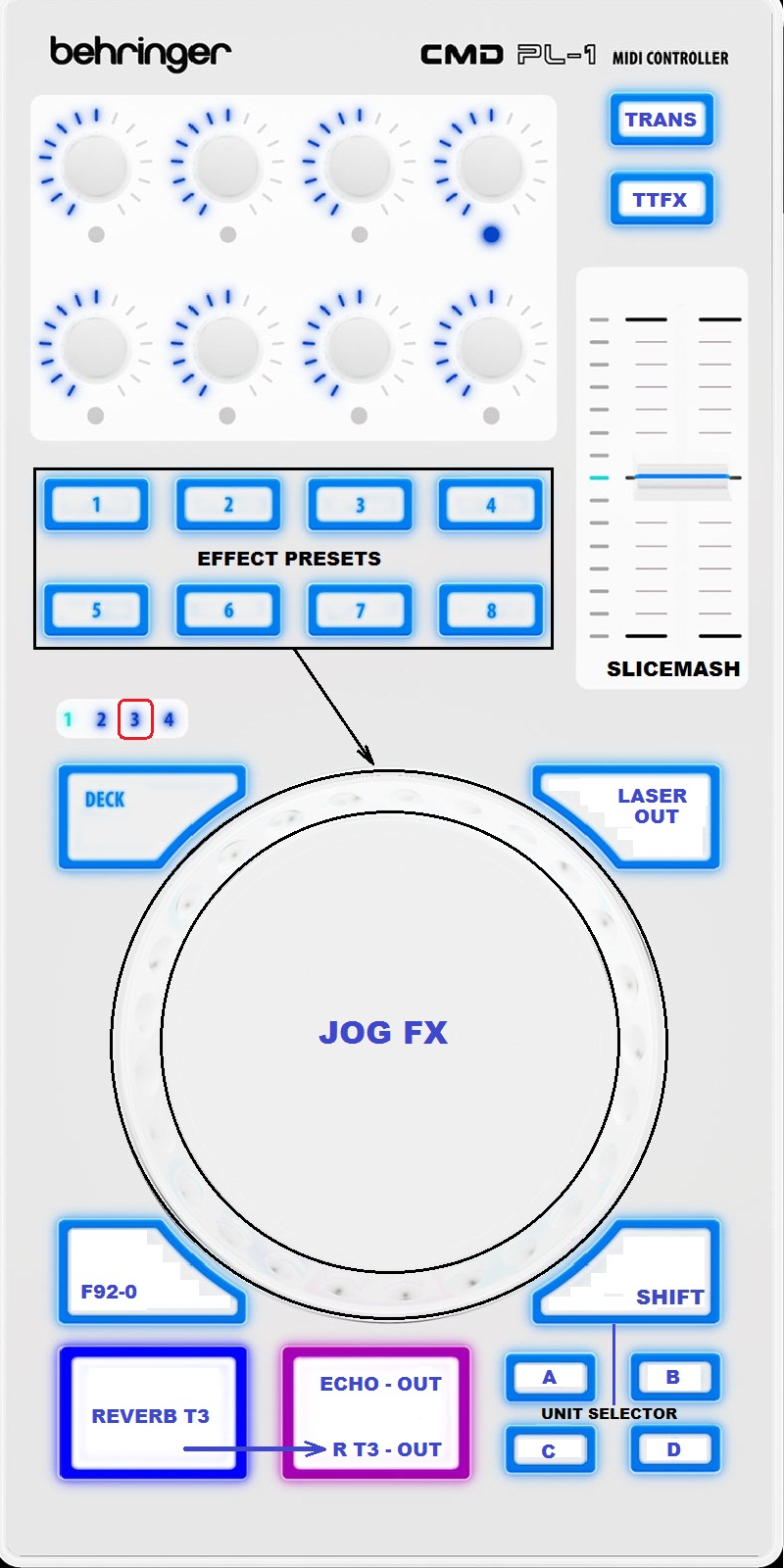

In difference from previous two pages everything here is pretty straight forward. Buttons 1-8 are modifiers for various jog FX presets and in each modifier state pressing the jog wheel will select and activate a different group of effects, turning the jog will modulate it. Slice mash is here as well and duo the fact the majority of jogFX are in unit1 and SM is set for unit2 the SM can be used to play on top of those effects. There are some INSTANT reverbs, echos, brakes, sweeps and one jogFX secondary action button too. I won’t go all the way about each preset here – I’ll be releasing another demo video that should cover all FE banks soon as I grab some time to record.
Double FX unit focus and deck unit selectors:
The eight LED ring push encoders are designed to control two units but FX units are four and encoder rows are just two so I brought an idea to map some modifiers that can offer me possibility to select any of FX units to both of encoder rows by holding shift. The first time you import this mapping and hold your shift (TAP) you’ll notice that encoder button LED’s start to flash suggesting you to push it and by pushing any of encoders that LED light will become solid indicating that you got that unit selected for that encoder row. And yes, every time the shift is on hold any other LED’s than unit which is currently selected will be flashing to indicate that selector is clear of that FX units. Good thing is that this double unit selector is available within any of firmware pages. The last but not least, while holding shift and turning upper enc row you can change loop size for all four decks and the same goes for bottom row except from here you can seek trough tracks for all four decks as well. Again all the pages!
As for effect assignment per deck, those are mapped in pages 2-3 and placed at four little buttons (same buttons where you select deck in page 1). Basically, hitting any of this four buttons will focus all four units for that deck leaving all units disengaged in other three decks and that’s on the fly. Holding shift and pressing this same buttons will toggle all four FX units for any deck - it’s really cool concept that I’m using for years.
Pretty much it. Let me know what everybody think. I’ll be updating this mapping a lot and already have took this tool to the next level.
DOWNLOAD
Big thanks to nem0nic for sending it out!
Cheers!
Stewe,
 Looks like some serious sterling work!!


