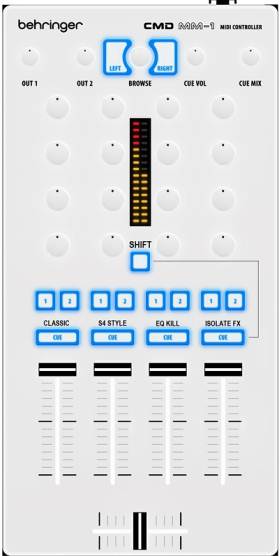
Behringer CMD MM-1 isolate [TRAKTOR]

Behringer CMD MM-1 isolate [TRAKTOR]

Welcome all,

This mapping will turn your MM-1 in four banks mode by simply holding shift and pressing one of monitor cue buttons giving you ability to use four layer of control. This is initial version of mapping and fully tested by me. Rocking solid :sunglasses:

DOWNLOAD

Bank 1: Classic style mixer

Line channels are A,B,C,D.
Cue button to monitor track.
Buttons 1 and 2 to assign effects to deck. Hold shift to assign units 3 and 4.
Rotary pot are bottom>up filter, low, middle, high. Use shift and small knobs to adjust gain (soft takeover).

Bank 2: S4 style mixer

This bank share same controls as bank one does but with difference that you’ll find kontrol S4 layout here - C,A,B,D.

Bank 3: EQ kills and x-fader assignsment

Classic style.
Button ‘1’ high kill, button ‘2’ mid kill, ‘CUE’ button low kill. Shift plus smaller buttons row to assign crossfader to any deck.

Bank 4: Isolator FX

Activating this bank gives you possibility to assign any of effects to specific EQ frequency using the deck duplicate command. Basic idea is to use deck focus buttons (A, B, C) to select deck you wish to use Isolator for. Then use ‘COPY’ button to duplicate track in to deck D and take advantage of that fourth deck if you’re into two or three deck mixing. This version of mapping supports Isolation only for one track deck at the time so everybody who is interested can try, learn and hopefully have fun using this mapping but I will update to another deck soon as people master this technique.

There are two ways in applying effects using my Isolator mapping. You can ether enable EQ band isolation like in video and trigger effect or to keep your effects always ON and kick them in by turning knob right after 12 o’clock. It’s basically a superfader.

Before using isolation go ahead and hit ‘KILL D’ button as I showed in video. It will kindly set all EQ’s up and get you ready to copy track without hearing playback from deck D even if the line fader is up. This is also your “panic” button. Use deck routing to target one deck or hold shift to assign multiple decks.

Global and Browser control

‘Out 1’ crossfader cruve.
‘Out 2’ master volume
‘Cue vol’ and ‘Cue mix’ are controlling as labeled.

Note that this knobs are set in soft takeover mode because they are sharing function with deck Gain (shift+) as mentioned before.

Push encoder to enter browser view (shift+ to open folders)
Scroll list (shift+ tree)
Load A and B (shift+ C and D)

DOWNLOAD

Enjoy!

Love the concept, can’t wait to get an mm1 and try it out.

Midi channels

Hi Stewe,

Downloaded your Traktor tsi and zilch, Im obviously doing something wrong.

OK im a noob at this and its only because the behringer site is down that i looked at something as advanced as this normally i would fully familiarize with the basics and use the manufacturers stuff before advancing, but i have no choice if i want to use my MM-1 in Traktor . So your mapping seems to be set to Midi channel 1 and my MM-1 seems to be on midi channel 5, i assume this is why my mm-1 and Traktor are not talking. How do i set My MM-1 to channel 1. Sorry if this is a Noob question but i did read the manual first.

laters
Ray:wink:

Wow!!!

Hi Stewe,

I didnt realise how hard you mapperists(made up word :wink:) work in bringing these midimaps to us. I now know why you get sent CMD’s you dont really get them for free, You have to work for them. So thank you for all the effort you have put in on our behalf :+1:

For some reason my MM-1 defaults to midi channel 5 and as your tsi is on channel 1 I have had to change all the channel 1’s to channel 5 and what a job thats been its taken forever, but worth it,I love the mapping :slight_smile: I did wonder if there was a way to make my MM-1 default to Channel 1 or maybe a program that could do it.

Laters
Ray :wink:

Browser section

Hi Stewe,

Love the mapping but am having trouble with the browser section, turning the browse knob only seems to go from the top of the list to the bottom but nothing in-between, have tried to sort it from within traktor but i really havn’t a clue what im doing. Any help appreciated.
Any mappings for the DC-1 yet? im having trouble because Behringers download site is down otherwise i wouldnt ask.

Laters
Ray :slight_smile:

I actually did get them for free and just to get my opinions of them. I’ve made this mappings because I like to share to community.

So you have set MIDI to ch1? Cool. I’ll look into this in report back - seems that encoder mode is inverted which shouldn’t be happening since I’m using this mapping every day without an issue.

Nope.. Don’t have one and didn’t receive any custom mapping request so far so I could share it.

Rey,

The mapping file is now updated to ch5 thanks to nem0nic’s edit. You can download it again and let me know if you still have an issue with your brows dial.

Assuming that you already have edited file yourself and have the push encoder re-mapped as well the encoder mode should automatically switch back to 7Fh so basically all you need to do is to set the mode back to 3Fh and you should be good to go.

Let me know,

Excellent !! sorted. The browser did the same thing but changing it from 7Fh to 3Fh did the trick and its working PURFECT thanks.

Fixed it and made a new update. Thanks for your feedback!!!

Enjoy

How did you guys change the tsi channel mapping? I received a DC-1 from a friend and it’s set to Channel 1 instead of the default Channel 6 newer DC-1s are configured to. All of Behringer’s tsi files are made for the new channels, too. I don’t have a Mac so I’m guessing instead of using the Xtreme Mapping app I’ll have to directly edit each button within Controller Manager. :disappointed:

Make a reply in CMD thread. I’m sure you’ll get a better chance for feedback on this matter.

Stewe, Any chance you still have the channel 1 mappings? My MM1 has come and it seems to be mapped to channel 1. I can’t even use the official behringer TSI it doesn’t work


I’m probably going to be buying a cmd mm-1 this week, so I’m very happy to see you made a mapping for it. Thank you

Help!!

I have no idea how to get the MM1 to work in Traktor. I impoted the tsi. I set the controller manager settings for the MM1
nothing is working. Is there a walk thru video for those who don’t understand the technical jargon you guys are using in the forum? I want to use my X1 MK2’s with this mixer.

Can someone help? Or this sucker is going back.
you can email me aasti3000@gmail.com

Help

I’m totally lost. Can you walk me thru the control manager as to what to do? I really want to use this device.

I had the same issue with my MM1. I downloaded the TSI from Behringer and remapped everything to Ch1.

You can download it here

I tried to do the same with Stewe’s mapping, but for some reason it still won’t work even after I remap everything to channel 1.

The standard Behringer version works fine now though.

Good luck

little help

not sure if you can help me with a similar issue, since im running ableton (8.2)..

i downloaded the ableton script from the behringer site, loaded everything correctly but no luck.
my MM-1 came out of the box on channel 1 so i went into the script and changed the channel from 4 to 0 and saved the file. reloaded ableton and still no go.. not sure if im missing something here. are there multiple places i have to change the channel value in the script code or anywhere else for that matter?

i tried to just map everything my self but the navigation alone seemed impossible.

If you’re using Xtreme Mapping app you can select all of the functions and change the channel in one step. No need to go one by one

Sorry mate, I have no experience with Ableton :disappointed:

Can’t get cue to work

Thanks for the mapping Stewe.

Unfortunately I can’t get the cue buttons to work. They light up, but don’t show the cue level on the LEDs.
What’s the midi controller or settings in Traktor I need to check?