Can I record my vinyl sets with my internal soundcard (Korg Zero 4)
So I was watching TV and I saw a hard dnb set, I immediately fell in love with the genre again. It’s been months since I played dnb.
And was real pumped and did an hour long set with all my HARD dnb records.
It was amazing. Best improv ever.
But is there a way to record that set ?
Please note:
-The mixer has a record out, but it’s currently in use, I hook up my speakers with RCAs instead of XLR.
-The mixer is digital and I can hook it up to a laptop with FireWire (Audacity perhaps ?)
I guess the only way is to buy one of those soundcards specificly made for this, but I don’t want to spend the money.
I’ve seen some routings but that is for traktor scratch setups…
I have a 13 inch MBP. It has no audio in port like the 15 & 17 inch models. Or does that mean that I have one port that works both ways ? I don’t know.
And my speakers don’t support XLR or anything else for that matter. Perhaps it’s time for an upgrade in that department.
And once the audio reaches your laptop then what ? Audacity ?
But actually I was really hoping I could work something out with the FireWire.
In audacity I can select the Zero 4 as an input source when hooked up with FireWire.
But the recordings are empty. Input VU-meters are showing nothing. Input volume in the software is at max level.
… sorry, cant quite understand what is going on here. what kind of mixer do you have? when you say using the digital on your mixer what does that mean? from my understanding, digital mixing (midi mode) would utilize the internal mixing on a dj program vs external mode, the analogue way of channeling in your decks on multiple sound outs. if you are trying to record you spinning vinyl, you would have to record by utilizing the record out or the speaker out on your mixer. digital will only record whats being mixed internally.
The mixer I have is a Korg Zero 4 (I think I mentioned that a few times) and I thought that digital is not necessarily MIDI (yes it can send MIDI, but that 's not relevant here)
I doubled checked and it can serve as a MIDI interface but also as an Audio interfaceit says in the manual that it can send the signal of an input source (TT or whatever) or the mixed signals to your computer.
ALSO NOTE: I did this vinyl set without any software, I never mixed in traktor or anything. You might have thought I was doing it in traktor. At least that’s what I got from your last post.
Does this give you a better idea of the situation ? I really hope I can work this out. I thought I had it when Audacity recognized the mixer but no…
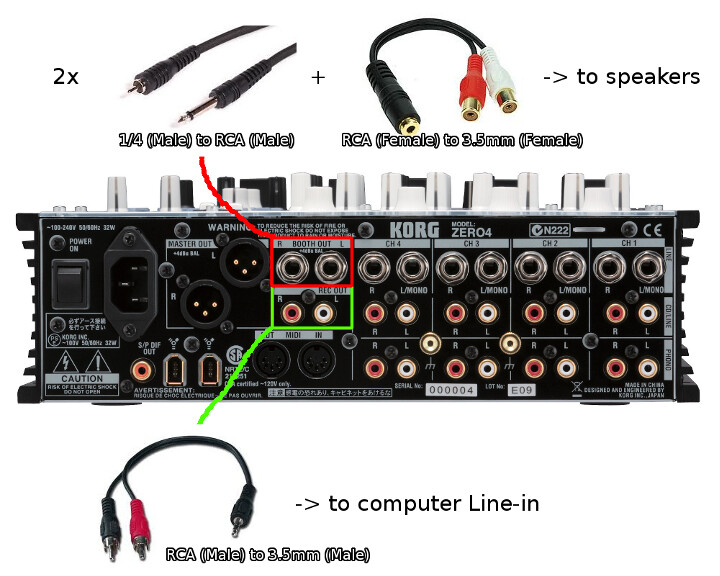
There probably is a way to utilize the audio interface, but I don’t know much about that mixer. I did however create this diagram for you. It is similar to how i have my mixer setup for recording.
lol, I dunno was just looking at the back of the mixer - it has S/PDIF out and your macbook has an in port so might work.
And lots less cables - and a pure digital signal.
But I have no idea really, never tried myself so don’t know if it works.
One thing I think I read ages ago when I was looking at buying one was there was a problem with mac’s and 192KHz setting so make sure it’s not that as well..
If you’re on a Mac go into Audio MIDI settings and see if you can find the sound card that way; you may be able to set the sound card to go directly through firewire which is what it sounds like you want to do. Most mixers with built in soundcards can do that. It sounds like you can see the mixer’s soundcard in your software but you’re not getting the right outputs from the mixer; the soundcard has more than one output so you have to find the ones that are actually sending the mix out through it. I’m sure it’s there, it is on most other mixers I’ve seen that have soundcards.
I don’t know audacity very well; I use a program called SoundStudio on the Mac and it allows me to select which output ports from the soundcard I want directly in the software. I would assume audacity has the same feature; if not, it should… then again, that may be something that has to be configured by the mixer somehow.
The mixer has a soundcard via firewire- install the zero 4 drivers and you should be able to record right off the soundcard into audacity or wherever with no extra wires or anything.
Yeah even if you end up recording over firewire I would still hook up the speakers this way to the main out via xlr and not the record out- record out doesn’t have volume control on the mixer.
the record option has no volume control so this is where I would utilize the recording software. I usually use the booth for my speakers so I can adjust volume on the fly and mute if I wanted to.
xlr to 3.5mm would be ideal, but I couldn’t find those cables locally so I’m just rocking booth outputs for now.
 It’s been months since I played dnb.