Need help mapping Trigger Finger Pro on traktor for remix decks…
hi There… i 've been trying to build a TFP mapping for the remix decks however my knowledge is limited this is a new for me , i’m glad finally someone builded a fine working TSI for the pioneer DDJ-sb2 wich I’m currently using and bought this trigger finger pro thinking that there’s got to be a tsi to use it with remix decks … if any body could possible help correct this or have a use of this mapping please dont hesitate to contact or post …any help most greatly apreciatted … cheeers .. and mix on… PS. I tried to upload the mapping but get kicked off it read some error message…
Thank you so much stewe for the mapping is great to count on someone willing to help !!! One more question. How do you go about volume levels on each cell ?? Is there a way to adjust output volume levels ? Or they need to be mapped? could this be posible ??? You have been of big help already. Cheerrs. Mate. Butterfingers
Will follow your tutorial and try to put it together. Although. I don’t have a big set up. If you simpatize that how the love for dee yaying starts. Is a passion. Thank’ s again and I’ll keep you posted when everythings works well …cheers…Buterfingers
[QUOTE=butterfingers;750382 Will follow your tutorial and try to put it together. Although. I don’t have a big set up. If you simpatize that how the love for dee yaying starts. Is a passion. Thank’ s again and I’ll keep you posted when everythings works well …cheers…Buterfingers[/
Did use same ports in /out for both TSI .. Now I’ll check on the tutorial how to map volume levels on slots , and additionally changed the DECK’S D midi signals to the RED Bank on the TRIGGER FINGER PRO .so far is exciting to work on this it really get you hyped// wanted to share the experience…if we acomplish a good standing TSI FOR IT maibe we can share it that would be great to give back something useful for the comunity of Dee yays, thank you Stewe…mix on …Butterfingers
[quote=“Stewe, post:7, topic:74861, username:Stewe”]
You are welcome mate! I’m always glad to help so if there will be anything else you need assistance with then please let me know.
Currently the mapping only supports one sample page (1st one). Maybe the next logical step is to add more pages to the mapping.
Also the buttons under the sliders seems ideal for "Slot Mute’ function.
[/quote]. Hi stewe, Did the mapping as sugested turn out that used the sliders as volume adjusters and buttons unders as mute … it works well. Been following tutorials from Mad Zack as well as to how to create your own remix sets , having a ball let me tell you … now. One ting I like to ask is if would be possible to instead of mute the sample or cell , stop it completely and turn on when necesary. To come back on the first one beat ? And how about unloading the sample or cell and reload a different. Can this be done ??? Remember. I’m using the TFP. So far so good. And excited … got some mad samples from MARRS pump of the volume. Deconstructed. Sound awesome , cheers. Mate and Mix On. Butterfingers
Nahh !!! still a work in progress But going on right direccion. It’s a little pain. Have to figure out faster way to switch beetween pads banks and control banks a little faster , and load and remove samples from cells the short cuts on the mac works fine but if you click buttons twice instead of stoping it an bring it to the beginning of the sample so metimes delete it … but i’d like to do it from the TFP if possible … cheers. Butterfingers
With correct modifier assignments this two in combination (mapped to one button) should do the trick
There is a built in modifier for that stuff: Add In > Remix Deck > Direct Mapping > Cell Delete Modifier
Map this mod to one of unused buttons on your controller and use it as a Shift type of feature (hold mod + hit cell trigger = unload cell)
As for copying samples from slot in to other slot you can use this command: Add In > Remix Deck > Legacy > Slot copy from Slot
This one I can’t remember how it is supposed to be set. I need to check this and get back to you later.
hi stewe been away from sometime needed to ventilate frustration a little. I’d like to add the following pages on the remix deck but can figure it out how to? like you said before “the next logical thing is to map additional pages on remix deck” have been trying to mapp it without success ,would you be willing to help me please …thank you …butterfingers
Sure thing mate. Creating a multi page mapping should be fairly simple. Firstly you would have to map a few buttons on your controller that are going to select different sample pages.
Add In > Remix Deck > Sample Page Selector
type = button
mode = direct
value = page x
Second, there is a modifier condition called “Sample Page Selector” which tells Traktor which Page is currently in use. For example, one button on you controller will have a control over one sample cell in each of the sample pages (cell 1 trigger, cell 5 trigger, cell 9 trigger and cell 13 trigger)
So at the end one sample slot mapping should look something like this:
Hi stewe… I ‘ve been workin’ on the mappin as you enlightme but I simple has not been able to figure out hot to map the sample cells on the next pages. (2,3,4). I followed you’re tutorial but I’m confused as to if I have to create new comands for page 2 Cell 1 and then trigger 5 , and so on. Page 2 cell 2 trigger 6. And so on … could you help me pne more time. Greatly. Apreciatted. Mix On. And thank’s again Stewe. Cheers
Yup, you should add all 16 triggers like it is shown in the pic from my previous post.
Can you upload TSI with your first sample page fully mapped? Maybe I can see what midi notes your controller uses and use cmdr to edit your mapping and ad more sample pages.
is there a way to send you the tsi via email. I’ve tried to upload it but gives me and error , no t been ablre to do it It hink I saw your email on a different tread, something like vstmidi@gmail.com correct me if I’m wrong maibe via email I can send it to you …let me know ..will keep trying to upload it fro your review… cheers… stewe and as always I’m in your debt for the support and help…butterfingers.
Hi Stewe.. I had to delete all previous tsi’s as they where conflicting with this I’ll work on it and get it to work , many thank’s for your time and dedication. Certainly people like you makes our dee yay world a lot better . Hopefully I’ll achive success and when I do. You’ll be the first one to know. Have a Happy and successful New Year.. and keep up the good work… always in your Debt. Butterfingers. A.k.a. Carlos Lopez.
Not able to upload/share trigger finger pro mapping for remix decks on traktor
HI stewe have tried to upload the mappind but no success some kind of error with the image file something would apreciate if you could post it, on the maps forums , don’t know how to help, would love to give something back to the dee yay comunity, cheersss mate and Mix oonnn…

 Here is a little tutorial for you mate.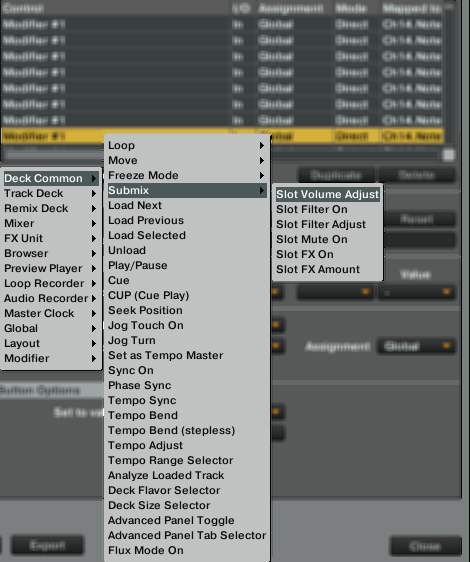

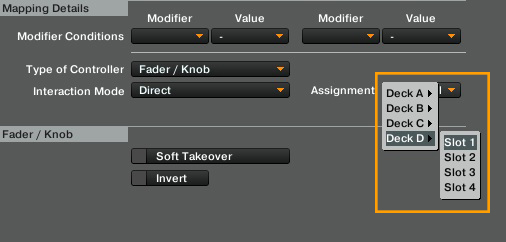
 thank you Stewe…mix on …Butterfingers
