Requesting Help: Mapping 2 Buttons to cycle thru Group Effect Presets

Requesting Help: Mapping 2 Buttons to cycle thru Group Effect Presets

***If someone can point me to a thread that already explains this concept please link it.
Im new to custom mapping but I understand what everything does, just need a work around.

So what I want is to be able to be able to use 2 buttons (left & right arrow buttons) to flip thru sets of group effect presets.
I already have my LaunchControl buttons mapped to enable FX Decks and I know how to map my preset effects,
1 button starts 2 FX decks (1 and 3) and I have 2 pots/knobs to control the wet/dry of those 2 FX decks,
only thing I cant figure out is how to get 2 buttons to cycle thru presets so the same buttons can do different FX.

Hopefully that makes sense. I’ll write out the basic functions of the mapping and controller below.
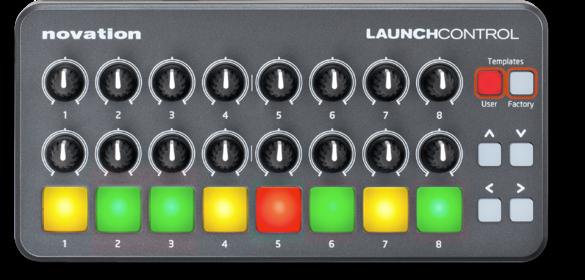
-2 Rows of 8 Knobs stacked vertically-
Top Row of Knobs 1-4 control FX Deck 1’s knob functions, thats A’s Wet Dry, FX 1,2,3 Wet/Dry or Amount.
and Knobs 5-8 are FX Deck 3. Same functions. And the 2nd Row is FX Decks 2 & 4.

There are 8 pads in a row below those, first 4 pads control FX Decks 1 & 3 (toggle or hold FX depending on the FX),
pads 5-8 control FX Decks 2 & 4, same functions.

The way each pad is set up is each button turns on all 6 FX slots of 2 decks, then i can use the knobs for full Wet/Dry control, can use an effect by itself, or blend both decks with the Wet/Dry knobs and have control of each perameter of the effect if needed.

But im back to the issue of what if i want to swap out FX for a different set, I want to use a button to cycle thru pages of presets, 1 button for each set of FX Decks (Left Arrow for 1 & 3, and Right Arrow for 2 & 4).

Ive been using Tekkens F1 mapping for a couple years now and love it, but I want more control and a way to blend FX. One thing I liked on that mapping is the use of the “pages” you could select, Ive looked thru the mapping but couldnt figure out how he got that to work, I want something similar but controlled by a button.

This is a fairly long writeup so I thank you for taking the time to read it and thank you even more if you could help me figure this mapping out!

Do you want to select effects directly by pressing arrow pads or should the arrow only switch the preset (state) and then select new effects by pressing FX On/Off buttons?

Id like the arrow to switch the effect with the arrow pads and the change be visual in Traktor (so i know what effects are currently selected as well as their default perameters). Then turn those effects on with the pads (The pads should only be an on/off via hold or toggle.
Since my initial post I figured out how to make each arrow pad cycle thru a modifier state (Left arrow cycles up 1-7, then resets back to 1 with another modifier). I also managed to map an effect group to both states 6-1 and 6-2, but they only show up in the effect deck/unit after pressing the appropriately mapped pad, instead of when their modifier state is selected.

[quote=“DJ Stereoscopic, post:3, topic:77179, username:DJ_Stereoscopic”]
Id like the arrow to switch the effect with the arrow pads and the change be visual in Traktor (so i know what effects are currently selected as well as their default perameters). Then turn those effects on with the pads (The pads should only be an on/off via hold or toggle.
Since my initial post I figured out how to make each arrow pad cycle thru a modifier state (Left arrow cycles up 1-7, then resets back to 1 with another modifier). I also managed to map an effect group to both states 6-1 and 6-2, but they only show up in the effect deck/unit after pressing the appropriately mapped pad, instead of when their modifier state is selected.
[/quote]
Yeah that is how you do it! Nice work :slight_smile:

Thanks! Do you happen to know how to get the effect to show up after pressing the arrow button without having too press a pad to start it? Like [If] Mod 6-2 gets selected by the arrow button being pressed, a preset effect group shows up in the fx deck, what would I use to make that happen?

If you set M6 to value of 2 you have to map your FX Selector commands to a same button \ Assign those commands to your effects of choice \ Set M6=2 to all FX Selector commands in this preset \ Finally click on “INVERT” under the button options. In this case scenario with a press of the button you will select prev/next FX Preset and insert effects up on release of the button.

Or you could assign those same FX Selectors to M6=1 which should be active modifier state before pressing a button (setting M6 to value of 2) to insert them instantly.
Also good idea is to map those buttons to kill all FX Slots so you can always start with a clear FX pattern.

Ahhh okay, that makes sense, i dont know why i didnt think about mapping it that way lol

And thanks for adding that “Invert” I didnt quite understand the reasoning behind it initially, but it fixes the wrong cycle issue.

Everything is looking good so far, hopefully I can finish this mapping by myself!
Curious, is there anything negative that could come from having a lot of assignments in a mapping? For mine i’ll have at least 100 effect selectors, just want to avoid bogging down my laptop due to an assignment heavy mapping if that is a thing. Thanks!

Glad to help :slight_smile:
You might want to keep your devices as few as possible. Adding many of those can slow down “load times” in Traktor. But if you have only one device (mapping) you don’t need to worry about it.

Happy mapping!

Is there a forced Order of Operations when you attempt to map 2 functions to a single button or knob?

Reason i ask is I have my FX Selectors all mapped via conditions to M6=1-7 so depending on which page 1-7 “M6” is, 1 of 4 (3 button/selectors) triggers that preset. So in order I press the first button on my LaunchControl, it should turn on Buttons 1-3 [hold] and depending on what page (M6=1-7) decides what FX Selectors become active. At least in theory… (So Each button on the LaunchControl decides which preset gets selected out of the 4 (4 buttons on the LControl) that are available for that M6=1-7 “page” that is currently selected)

Hopefully that makes sense. Now the issue im having is that something seems to be conflicting when i push the LControls first button, if theres an effect in the FX Selector 1’s slot and I push the button, the effect activates [hold], and when its released the FX Sel. resets to “no effect” since LControl’s first button decides which of 4 Effects gets selected. BUT, after it resets to “no effect”, LControls first button doesn’t and activate the effect mapped to it but it does select it (so slot changes to the effect but the orange button doesnt turn on). M6=1 is on, both assignments are mapped to the right button, but it seems like its only reading the one button.

Is this mapping concept a little adventurous for Traktor to handle?

Thanks!!!

If I understand this right you are missing the “FX Store Preset” command. Simply map this command to your FX Selector buttons (Add In\FX Unit\FX Store Preset)

And don’t forget to set it on Invert.

That didnt seem to fix it, no change occurred. Doesn’t FX Store preset just act as a hot cue for the FX Snapshot feature?
The Effect i want and mapped to that button is showing up in the proper FX Selector slot, BUT only when I release the button (because inverted) but its not activating the effect even tho i have “Button 1” mapped to it as well. It seems like the order of operations is wrong for the button, like instead of selecting the Effect and simultaneously turning it on its just selecting the Effect on an inverted hold.

[Trying to troubleshoot while i write these replies lol, this next paragraph is a work around attempt]
I added another 4 modifier assignments [M5=1-4] And mapped each to buttons 1-4 on the Lcontrol in hopes it would help the mapping decide which action to do, and it worked, each button now turns on Button 1. I then added M5=1-4 to the first 4 FX Sel. slots (the first 4 are all mapped to work on the first Effect Bank Page [M6=1]) and it works sort of, the Effect changes to the right Effect with the first press, but doesnt turn on till i press the button again. And if i press another button on the LControl for a different effect it turns the Effect on upon holding, then changes to the appropriate Effect on release, then it works with another press. I just want it to change to the effect and turn it on at the same time lol I think I cant have the FX Sel. set to Invert due to it forcing the effect off after release of the button, so if i want the tail end of a delay or reverb it’ll have to stay on. I do believe the Invert was simply for when I had it mapped to the “pages” so that they’d show up when the page was selected correct? That obviously cant work with the buttons each selecting the effects so sorry if ive dragged you thru my crazy progressive mapping lol

The Store preset worked perfectly fine ever since NI added it in 2.5. Maybe there are some conflicting messages in your mapping.