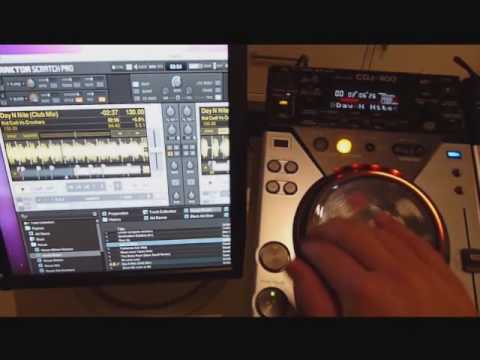
Simple? 2 CDJ400s Running HID in Traktor Pro. How?
I have been all over the internet, from Pioneer, to NI, even some German websites but no one seems to grasp the concept fully of how to run them in HID. Many had to downgrade Traktor to 1.2.1 to even run them in MIDI.
I am upgrading from a controller to the CDJs as well as a DJM400 and would like to use Traktor with them in HID mode NOT MIDI for higher resolution.
It is a pretty basic Set-Up and I know it can be done, but am not seeing one thing leading to it. On Serato, yes, on Traktor Pro, no. I know Traktor 1.2.7 now allows HID support though.
Can someone please first tell me if it’s possible, and then, if you could, guide me through the steps to make it happen?
In order to make an aggregate device on the PC, you need to have the CDJs plugged in (after you’ve installed their drivers) then go to Audio Setup in Traktor and in the Audio Device menu, choose ASIO4ALL. This should open up the device manager where you need to choose both CDJs.
Then go to Output Routing and click on External for the Mixing Mode. Assign your CDJs accordingly.
Then for the maps, usually once you have your CDJs plugged in, Traktor should recognize them, at which point you choose which deck they need to focus on, on the CDJs themselves.
Under Controller Manager in Traktor Preferences, you should see 2 Pioneer.CDJ maps. These are HID maps that pop up standard once you plug in a CDJ and are assigned to their respective CDJs by the In-Port.
If you want to make your own HID map, you can customize these are if you’d like to start from scratch you can click on the Add button right under Device, go to Pioneer and click on CDJ400. This will open up a blank HID map which you can customize yourself.
A way to know if you’re using HID and not MIDI is that all of the track info of the song you’re playing shows up in the CDJ’s screen.
As for the sound, just plug in your CDJs to your mixer with RCA connectors and you should be good to go.
played with this set up over at a buddy of mine. Just connect both directly via usb to your pc. hook up your audio card. And select the CDJ400’s in traktor. No extra software needed.
Yeah I purchased them already. I will know here for sure in the next week or so and let you know. If it doesn’t work, then I’ll just run them without software, no big deal.
I know for sure that they work because this is the setup that I use. Plugging them straight into your computer (even after you’ve already opened Traktor) will set them up for HID automatically.
And yes, the soundcards CAN be aggregated on both MAC (core audio) and PC (ASIO4ALL)
I’ve tried and use them both ways (depending on the computer I’m using).
All the steps are correct. I didn’t do it that way because I like to do it all manually. I did import the generic CDJ400 tsi and then made a custom mapping out of that.
That video is also for a MAC so you wouldn’t use ASIO4ALL, you’d be using CoreAudio.
From your signature, it looks like you have the Audio2 DJ so you could keep running sound like you normally would from that. And if you have the latest version of Traktor, all you’d have to do would be to plug in your CDJ-400s into your computer and set them to USB Then your computer should recognize them, at which point you select which deck you want your CDJ’s to control, on the CDJs themselves with the rotary encoder/push knob.
I’ve did everyting you ask. But, my both channel only out in one channel only. I didn’t use any audio interface soundcard. Please help me. Thanks before.
Opened audio midi setup with both cdjs plugged in made an aggregate device, then made sure the outputs were correct.
Then went into traktor and set it up from the controllers and and then selected my external outputs.
The problem with the cdj isn’t that it doesn’t read midi, or hid, but that it sees both cdjs as one device therefore runs it as one channel on an external mixer.
Eksternal output? Remember that i didn’t use any audio interface. My sound didn’t want to come out if i choose asio4all v2.
What should i do to make HID mode or midi showen up?
Because it said that traktor scratch pro 1.2.7 is already compatible with cdj400.
If you essential to accomplish your own HID map, you can build these are if you’d equal to sign from scratch you can click on the Add add faction low Manoeuvre, go to Pioneer and sound on CDJ400. This leave lawless up a clean HID map which you can construct yourself.
Hi, i have a similar problem, ive gone through most of those step and all instalation steps that are on this page. but when i come to choose the cdj in output routing, its says not conected. as in it cant find a the cdjs.
If i go down to ASIO4all bottom right of the screen i can see cdj 400 but cant go into it to select it. this is when my cdjs are plugged in.
also had a little go on virtual dj but a problem there if anyone knows, not that i use it now i have traktor. but on there it recognises it all perfectly and works if i load a track on one side were ok, but if i then load another it replaces the other aswell, so both decks with the new track.
any help with this would be great, posted on this because i have a similar problem to you. i run windows 7 on pc. and traktor 2. cheers
Does Traktor crash if you change the CDJ from HID mode to CD/USB mode? What if you simply take the device off of Traktor’s output? Wondering about if you were to roll up with just your laptop to a club and use CDJs in HID and be able to transition DJs smoothly?